

Shopify Product Variants vs Custom Options
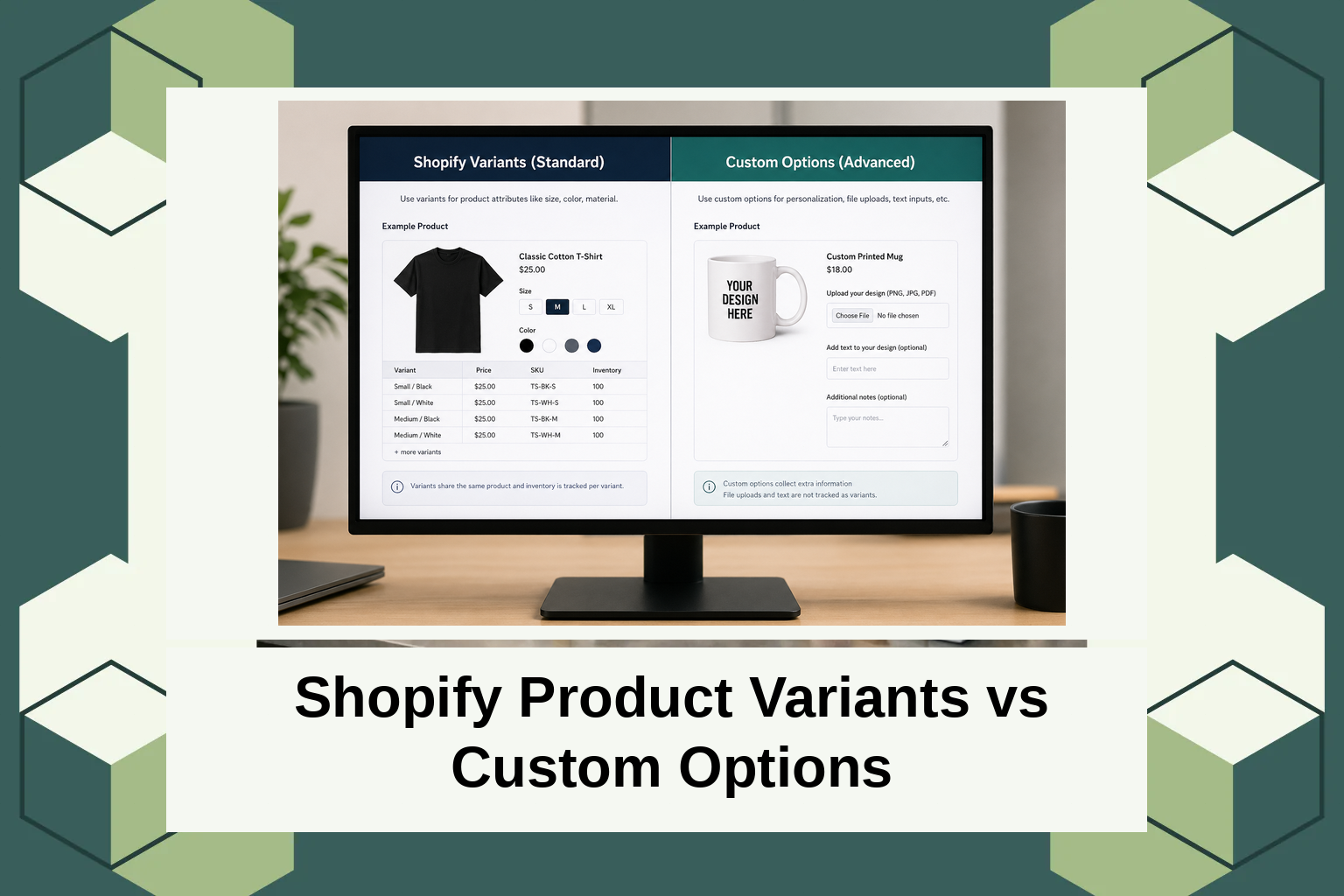
Shopify Product Variants vs Custom Options
Introduction
In the bustling world of e-commerce, managing inventory effectively is crucial. Shopify alone powers over a million businesses worldwide, reflecting the importance of careful product management. For store owners, the decision between Shopify Product Variants Custom Options can significantly impact how they manage stock and customer choice.
This blog post will guide you through the understanding of Shopify product variants and custom options. By the end, you will have a comprehensive insight into which option best suits your business needs, along with tips on implementation.
What Are Shopify Product Variants and Custom Options?
Shopify product variants are different versions of a product that can have specific attributes like sizes, colors, or materials. This feature exists to help businesses keep precise track of stock for each variation of a product. Variants are particularly useful for merchants who need to offer multiple options per product in a structured manner.
Custom options, on the other hand, provide a way to offer a range of choices without creating separate stock-keeping units (SKUs) for each combination. This approach is ideal for businesses that offer personalized products where the exact combination does not need individual stock tracking. Custom options allow for greater flexibility in customization, catering to a more unique user demand.
Shopify Product Variants vs Custom Options: A Detailed Comparison
When comparing Shopify Product Variants Custom Options, it’s important to recognize the differences in functionality and application. Variants are tied to the inventory system, allowing for detailed stock management and automated price adjustments based on the variant chosen. For example, a T-shirt available in various sizes and colors would use variants to track stock for each combination. More detailed guidance on product variants can be found in our AeroApps product customization tools.
Custom options provide greater flexibility in offering choices but do not inherently track inventory at the option level. This is useful for items that require simple customizations, like engraving or color preferences, without the need for complex inventory management. Industries offering bespoke or highly personalized goods often rely on custom options to meet their customer needs.
Types of Widgets
Widgets can add considerable value to your Shopify store. They enhance user interaction and facilitate choices without complicating the backend system. AeroApps offers a variety of widgets catering to different needs. Whether you’re a start-up or a growing brand, these tools improve how customers interact with your store.
Standard widgets like size or color selectors can streamline the shopping process, providing customers with visible options directly on product pages. For stores focusing on personalized goods, custom text or image upload widgets allow customers to make their purchases unique to their taste. These widgets integrate smoothly with your Shopify store framework, ensuring a seamless customer experience. Visit AeroApps for a comprehensive toolset that includes options such as dynamic pricing widgets and multipurpose selectors.
Pricing
Pricing for Shopify apps can vary widely based on functionality and support. While some basic product variant tools may come free with a Shopify plan, premium tools like those provided by AeroApps often offer tiered pricing based on features and store size.
AeroApps, for example, provides an affordable solution that caters to stores with various customization needs. Detailed pricing is available, allowing business owners to budget according to their requirements without additional costs hidden in plain sight. Real-time price adjustments and extensive support further add to the value that AeroApps offers its clients.
Why It Matters: The Importance of Choosing Between Variants and Custom Options
Understanding whether to use product variants or custom options is crucial for Shopify merchants because it impacts the operational efficiency and customer experience. As the e-commerce industry continues to grow, merchants who can efficiently manage inventory and offer personalized shopping experiences have a competitive advantage. A key insight is that variants allow you to manage complex inventory levels, while options can improve user experience by offering product customization without added inventory complexity.
The current market trend towards personalization makes custom options increasingly necessary. Customers today value tailored experiences, and businesses that can offer them are more likely to convert visitors into loyal customers. AeroApps provides extensive tools to assist Shopify merchants in leveraging both product variants and custom options, ensuring both the backend processes are streamlined and customer interfaces are intuitive.
With 5 million monthly users, AeroApps continues to be a preferred choice among Shopify merchants seeking to differentiate their storefronts with efficient customization options. By aligning with today’s market expectations, it stands out as a reliable partner for any e-commerce journey. When deciding on Shopify Product Variants Custom Options, leveraging such tools is key.
How It Works: Practical Insight into Setting Up Variants and Options
Setting up Shopify product variants involves defining each attribute for your product and entering these into the Shopify admin panel. Common attributes might include size and color, with each unique combination being a separate variant tracked in inventory. This process ensures detailed monitoring of stock levels and sales insights.
Custom options, on the other hand, are set up using Shopify apps or built-in plugins that allow selections without the complexity of variant tracking. Add-ons like product customization fields or choice-based add-to-cart buttons can be easily deployed with tools like those from AeroApps.
Merchants need to consider their store requirements carefully before deciding. For those needing guidance, AeroApps provides onboarding support and a help center to ensure you maximize productivity from your chosen features. By visiting AeroApps, merchants can access these resources directly and start building store functionalities that align with their strategic goals.
Conclusion
Deciding between using Shopify product variants or custom options can define the efficiency and user experience of your e-commerce platform. Using available resources provided by authoritative tools like AeroApps can help streamline this process effectively. Find out more by visiting AeroApps to determine which solution best fits your store’s needs.
FAQs
What are the limitations of Shopify product variants?
Shopify limits each product to a maximum of 100 variants and up to three custom option attributes. This can pose a challenge for businesses with extensive product lines. Apps like AeroApps can help extend functionality to overcome these limitations.
How do custom options impact the checkout process?
Custom options allow for more flexibility during checkout through personalized selections, offering a unique shopping experience. However, they do not track inventory levels individually. This aspect must be managed separately to ensure product availability.
Can I use both product variants and custom options together?
Yes, utilizing both can enhance customer choice and inventory control. Integrating both methods strategically on your store can enhance the shopping experience while effectively managing backend operations. Tools like AeroApps provide the functionality to seamlessly blend both into a coherent strategy.
Are there additional costs associated with implementing custom options?
Implementing custom options typically involves using an app with additional subscription costs. Pricing varies by provider and feature set. AeroApps offers competitive pricing that varies according to business size and customization needs, ensuring cost-effective solutions.
